
Coordinating a group event often ends with endless messages and missed replies. Over 60 percent of group planners say finding a single time that works for everyone is their biggest headache. Whether you are organizing a family get together, a work meeting, or a social hangout, the traditional back and forth can waste hours. This guide breaks down the best tools and strategies to make group scheduling simple, fast, and stress free.
Table of Contents
- 1. WhenNOT: Simplifying Group Scheduling by Inverse Availability
- 2. Doodle: Polling for the Best Event Date
- 3. Google Calendar: Shared Schedules and Invites
- 4. Rally: Quick Consensus on Group Event Timing
- 5. Teamup: Organizing Events with Collaborative Calendars
- 6. Facebook Events: Social Group Planning Made Easy
- 7. WhatsApp Groups: Coordinating Details and Updates
Quick Summary
| Takeaway | Explanation |
|---|---|
| 1. Use WhenNOT for inverse scheduling | This platform asks for unavailable times, simplifying group event planning by reducing communication overhead. |
| 2. Doodle is effective for voting on dates | Participants can vote on preferred options, allowing for quick identification of mutually available times. |
| 3. Google Calendar enhances collaborative scheduling | It allows sharing of individual schedules, making it easier to coordinate group events with visibility of each member's availability. |
| 4. Rally streamlines event timing decisions | This tool facilitates rapid preference mapping to find agreeable time slots without prolonged negotiations. |
| 5. WhatsApp Groups enhance real-time communication | Instant messaging allows participants to coordinate details and share updates seamlessly during the planning phase. |
1. WhenNOT: Simplifying Group Scheduling by Inverse Availability
Planning group events can feel like solving a complex puzzle. WhenNOT introduces a revolutionary approach to scheduling by flipping traditional availability tracking on its head. Instead of asking participants when they are available, this innovative platform asks participants to mark when they are not available.
The core concept is brilliantly simple. Imagine gathering friends for a weekend retreat or coordinating a multi-day corporate meeting. Traditionally, you would send endless emails asking "What times work for you?" WhenNOT eliminates this communication chaos by letting participants quickly mark their unavailable dates.
Here's how it works: You create an event and set a potential date range. Then you share a unique link with participants who can mark their busy days without creating an account. The platform instantly visualizes everyone's unavailable periods, making it easy to identify the optimal dates for your group.
Key Benefits of WhenNOT:
- No account creation required
- Privacy focused scheduling
- Faster date selection process
- Works for any group event type
Learn more about group scheduling strategies to streamline your event planning even further. Whether you're organizing a family reunion, team retreat, or social gathering, WhenNOT transforms the traditionally complex scheduling process into a straightforward, user friendly experience.
2. Doodle: Polling for the Best Event Date
While WhenNOT uses inverse scheduling, Doodle takes a more traditional polling approach to group event planning. This popular platform helps teams and groups coordinate schedules by allowing participants to vote on their preferred dates and times.
Doodle simplifies the often frustrating process of finding a mutually convenient meeting slot. You create a poll with potential dates and times, then send a unique link to participants. Each person can mark their availability across multiple options, making it easy to see which time slots work best for everyone.
Why Doodle Works Well:
- Intuitive voting interface
- Supports multiple event types
- Free basic functionality
- Quick schedule comparison
The platform shines in scenarios like planning team meetings, social gatherings, or coordinating across different time zones. Participants do not need to create accounts to respond, which reduces friction and increases participation rates.
Explore more scheduling tool comparisons to find the right solution for your specific group planning needs. Whether you are managing professional conferences or organizing casual get togethers, Doodle provides a straightforward way to align multiple schedules with minimal back and forth communication.
3. Google Calendar: Shared Schedules and Invites
Google Calendar stands out as a powerful tool for group event planning by transforming individual schedules into collaborative experiences. Shared calendars eliminate the guesswork of coordinating multiple people's availability.
According to Google Support, users can create and share calendars with team members, allowing everyone to view each other's schedules and potential openings. This feature is particularly valuable for professional teams, families, and social groups who need to synchronize their activities.
Key Advantages of Google Calendar:
- Seamless event invitation system
- Real time schedule updates
- Cross platform accessibility
- Free to use for basic features
The platform makes event management incredibly straightforward. Learn more about practical scheduling strategies to maximize your group coordination efforts. As Google Support explains, inviting participants is as simple as adding their email addresses to an event, with automatic notification and RSVP tracking ensuring everyone stays informed and aligned.
4. Rally: Quick Consensus on Group Event Timing
Rally transforms group scheduling from a complex negotiation into a streamlined decision making process. This innovative platform focuses on helping teams and social groups quickly agree on event dates without endless back and forth communication.
Unlike traditional scheduling tools that rely on multiple email exchanges, Rally provides an intuitive interface where participants can rapidly indicate their preferences. The platform uses smart algorithms to quickly highlight the most agreeable time slots for everyone involved, reducing scheduling friction.
Key Features of Rally:
- Instant preference mapping
- No account creation required
- Visual time slot comparisons
- Quick consensus generation
Rally proves especially useful for distributed teams, friend groups planning social events, and organizations with members across different time zones. Learn more about efficient group scheduling techniques to optimize your event planning approach. The platform essentially eliminates the traditional pain points of coordinating schedules by presenting a clear visual representation of collective availability, making group event planning feel less like a chore and more like a collaborative experience.
5. Teamup: Organizing Events with Collaborative Calendars
Teamup transforms collaborative scheduling from a complex challenge into an elegant solution for groups seeking intuitive calendar management. This platform stands out by offering shared calendars that can be customized and segmented to meet diverse organizational needs.
Unlike traditional calendar apps, Teamup allows you to create multiple sub calendars within a single interface. This means teams can manage different projects, departments, or event types without overwhelming a single view. Imagine having separate calendars for marketing events, team retreats, client meetings and personal schedules all in one place.
Key Advantages of Teamup:
- Granular access permissions
- Multiple calendar views
- Easy sharing capabilities
- Color coded event tracking
Learn more about collaborative scheduling workflows to enhance your group coordination strategies. Teamup particularly excels for organizations with complex scheduling requirements like schools, nonprofits, and businesses with distributed teams. The platform enables precise control over who sees what, ensuring that sensitive information remains confidential while maintaining transparent team communication.
6. Facebook Events: Social Group Planning Made Easy
Facebook Events turns social networking into a powerful group planning tool. With just a few clicks, you can transform casual online connections into coordinated real world gatherings.
According to Facebook Help, the platform allows users to create events, invite friends, and track RSVPs seamlessly. This integration with existing social networks makes event planning feel natural and effortless, eliminating the need for multiple communication channels.
Key Facebook Events Features:
- Instant friend invitations
- Real time RSVP tracking
- Event discussion threads
- Integrated location sharing
Learn more about group event planning strategies to maximize your social coordination efforts. Whether you are organizing a birthday party, family reunion, or community meetup, Facebook Events provides a user friendly platform that leverages your existing social network to simplify event management. The tool works particularly well for informal gatherings where most participants are already connected through social media.
7. WhatsApp Groups: Coordinating Details and Updates
WhatsApp Groups transform instant messaging into a powerful event coordination platform. With billions of users worldwide, this communication tool offers an intuitive way to keep everyone informed and connected during group planning.
According to WhatsApp FAQ, groups enable users to communicate with multiple participants simultaneously, making real time event discussions seamless. Whether you are organizing a family reunion, weekend trip, or community gathering, WhatsApp provides an immediate communication channel for sharing updates, logistics, and last minute changes.
Key WhatsApp Group Features:
- Instant message broadcasting
- Media sharing capabilities
- Real time location updates
- Easy participant management
Discover more about effective group coordination strategies to enhance your event planning approach. WhatsApp Groups excel in scenarios requiring quick communication and collective decision making, allowing participants to share photos, vote on options, and stay connected throughout the planning process without switching between multiple platforms.
This table provides a summary of various group scheduling tools and their unique features, benefits, and best use cases.
| Tool | Features | Benefits | Best For |
|---|---|---|---|
| WhenNOT | Inverse availability marking No account required | Privacy-focused Faster date selection | Any group event type |
| Doodle | Traditional polling Intuitive voting interface | Quick schedule comparison Free basic functionality | Team meetings and social gatherings |
| Google Calendar | Shared calendar access Real-time updates | Seamless event invitations Cross-platform access | Professional teams and social groups |
| Rally | Instant preference mapping Visual time slot comparisons | Quick consensus generation No account required | Distributed teams and friend groups |
| Teamup | Multiple sub-calendars Granular access permissions | Customized views Easy sharing capabilities | Organizations with complex scheduling |
| Facebook Events | Integration with social networks Event discussion threads | Instant invitations Real-time RSVP tracking | Informal social gatherings |
| WhatsApp Groups | Instant messaging Media sharing capabilities | Real-time updates Easy participant management | Quick communication and updates |
Simplify Your Group Event Planning with WhenNOT
Coordinating group events often feels overwhelming with endless back and forth to find the best date. This article highlights how traditional tools either ask when you are available or rely on complex polls, which can lead to confusion and delays. If you have faced challenges like managing multi-day events or balancing everyone's busy schedules, WhenNOT offers a fresh solution by focusing on when people are not available. This inverse scheduling method removes friction and speeds up consensus, especially for extended or flexible events.
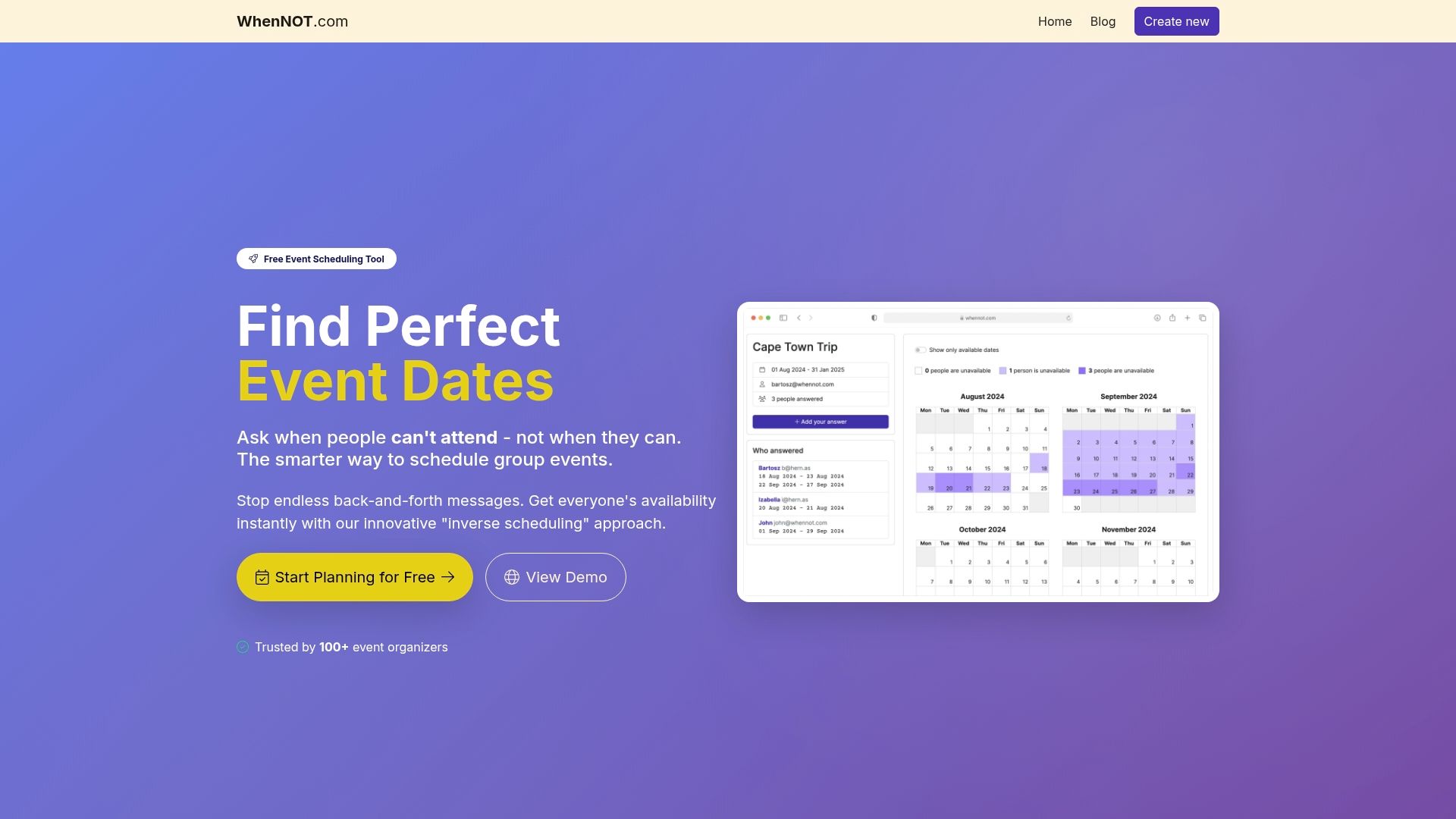
Ready to take the hassle out of planning? Discover how WhenNOT lets attendees mark their busy days quickly and privately without account sign ups. The platform’s visual calendar instantly reveals optimal dates so you can finalize plans faster and with confidence. Explore practical strategies on how to streamline group availability and see why so many event organizers trust WhenNOT over traditional apps. Start planning your next group event effortlessly by visiting WhenNOT online scheduling today.
Frequently Asked Questions
What are the key benefits of using group event apps for planning?
Using group event apps simplifies the planning process by allowing participants to easily indicate their availability and preferences. By reducing back-and-forth communication, apps can speed up decision-making and lead to quicker event confirmations.
How does WhenNOT differ from traditional scheduling tools?
WhenNOT asks participants to indicate when they are unavailable, flipping the common scheduling approach. To streamline your scheduling, use WhenNOT to visualize unavailability easily, helping you identify optimal dates faster.
What features should I look for in a group event planning app?
Key features to consider include account-less participation, real-time updates, intuitive interfaces, and the ability to handle multiple event types. Evaluate apps based on your specific needs, such as the ease of coordinating across different time zones or large groups.
How can I effectively use Doodle for scheduling team meetings?
To use Doodle effectively, create a poll with various potential meeting times and share the link with team members. Encourage participants to mark their availability so you can see which option works best, aiming to finalize the meeting date within a few days.
Can Teamup help manage events for larger organizations?
Yes, Teamup is excellent for larger organizations as it allows the creation of multiple sub-calendars. Start by setting up separate calendars for different departments or projects, which can help streamline communication and coordination across teams while keeping everyone informed.
What role does WhatsApp play in event coordination?
WhatsApp facilitates real-time communication for event coordination through group chats, allowing participants to share updates and discuss details instantly. To maximize its effectiveness, create a group for your event and regularly update members on planning progress and logistics.