
Time constraints are a constant challenge for American event organizers trying to coordinate multi-day corporate retreats. Studies show that over 60 percent of American teams encounter major delays due to unclear objectives and inefficient scheduling. Getting everyone on board without endless email chains can test anyone’s patience, especially with busy leadership. Discover how clear American-style planning combined with group-friendly tools can help you avoid bottlenecks and keep participation high from start to finish.
Table of Contents
- 1. Define Clear Event Goals And Objectives
- 2. Choose The Right Scheduling Tool For Groups
- 3. Set A Flexible Date Range Early
- 4. Make Participation Simple And Accessible
- 5. Visualize Group Availability To Avoid Conflicts
- 6. Communicate With Transparency And Privacy
- 7. Review And Confirm The Final Event Plans
Quick Summary
| Key Message | Explanation |
|---|---|
| 1. Define SMART Goals | Establish Specific, Measurable, Attainable, Relevant, and Time-bound objectives to guide your event planning effectively. |
| 2. Use Advanced Scheduling Tools | Choose tools that enable visual availability mapping to reduce scheduling conflicts and streamline participant coordination. |
| 3. Set a Flexible Date Range | Allow a broader timeframe to improve participant turnout and accommodate varied schedules for the event. |
| 4. Enhance Accessibility | Design inclusive events by considering diverse participant needs and providing multiple engagement options for every attendee. |
| 5. Communicate Transparently | Maintain clear and privacy-conscious communication regarding event details to build trust and respect participant boundaries. |
1. Define Clear Event Goals and Objectives
Successful event planning begins with crystal clear goals that transform vague intentions into actionable strategies. When organizing group events, your objectives serve as the strategic compass guiding every subsequent decision and resource allocation.
Defining SMART goals provides a systematic framework for event success. These goals are Specific, Measurable, Attainable, Relevant, and Time-bound. By establishing precise event objectives, you create a roadmap that aligns your group's efforts with broader organizational outcomes.
For corporate retreats or multi-day gatherings, your goals might range from team building and skill development to networking and strategic planning. Each objective should answer key questions: What do you want to achieve? Who needs to be involved? What metrics will demonstrate success?
Break down your event objectives into clear, quantifiable targets. Instead of a vague goal like "improve team communication," create a specific target such as "facilitate 3 collaborative workshops where 90% of participants contribute actively" or "generate 5 cross-departmental project ideas during the retreat".
Consider involving key stakeholders early in the goal-setting process. Their input can provide diverse perspectives and increase buy-in for the event's objectives. This collaborative approach ensures that goals are comprehensive and meaningful to all participants.
Pro tip: Create a one-page goal summary document that clearly articulates your event objectives, making it easy to communicate expectations to all participants and track progress effectively.
2. Choose the Right Scheduling Tool for Groups
In the complex world of event planning, selecting an appropriate scheduling tool can make the difference between organizational chaos and seamless coordination. Effective group scheduling requires a strategic approach that goes beyond basic calendar management.
When evaluating scheduling platforms, focus on tools that offer robust group management capabilities. Scheduling tools with flexible polling features) enable event organizers to efficiently coordinate multiple participant availabilities without endless email exchanges. These platforms can dramatically reduce communication time and minimize scheduling conflicts.
Key considerations when choosing a scheduling tool include integration capabilities, user experience, and scalability. Look for solutions that seamlessly connect with popular calendar platforms like Google Calendar and Microsoft Outlook. The tool should allow participants to input their availability easily without requiring complicated signup processes.
Must-Have Scheduling Tool Features: • Automated time zone conversions • Group availability visualization • Simple participant invitation mechanisms • Mobile device compatibility • Customizable scheduling preferences
Consider your specific event requirements when selecting a tool. Corporate retreats might need more complex scheduling features compared to smaller social gatherings. Some platforms specialize in group scheduling across different industries, offering tailored solutions for various organizational needs.
Pro tip: Test multiple scheduling tools using free trials and involve a small group of potential participants to assess user friendliness and practical functionality before committing to a specific platform.
3. Set a Flexible Date Range Early
Successful group event planning hinges on strategic timing and adaptability. Setting a flexible date range allows organizers to maximize participant availability and minimize scheduling conflicts.
Instead of fixating on a single date, create a broader potential timeframe that accommodates diverse participant schedules. This approach recognizes that individuals have complex professional and personal commitments that can impact their availability.
Benefits of a Flexible Date Range: • Increases potential participant attendance • Reduces scheduling complexity • Demonstrates organizational understanding of participant constraints • Provides alternative options when conflicts arise
When establishing your date range, consider factors like: • Work schedules • Academic calendars • Holiday periods • Regional conference schedules • Potential travel restrictions
Effective date range selection requires proactive communication. Reach out to key participants early and request their general availability windows. This collaborative approach helps you identify optimal timing that works for the majority of your group.
Utilize scheduling tools that allow participants to indicate their unavailable dates rather than trying to find a single perfect time slot. This inverse scheduling method simplifies coordination and reduces the administrative burden on both organizers and participants.
Pro tip: Create a preliminary date range with at least three alternative options, allowing you to pivot quickly if initial scheduling attempts encounter resistance or low participant availability.
4. Make Participation Simple and Accessible
Creating an inclusive event means designing an environment where every potential participant feels welcomed and empowered to engage fully. Accessibility goes far beyond physical accommodations and requires thoughtful planning across multiple dimensions.
Understanding participant diversity means anticipating and removing potential barriers to participation. This approach recognizes that attendees come with varied abilities, communication preferences, and technological comfort levels.
Key Accessibility Considerations: • Physical venue layout and mobility access • Communication method flexibility • Technology platform compatibility • Sensory accommodation options • Language and translation support
When planning your event, consider multiple engagement channels. Some participants might prefer digital interaction while others need in person communication. Provide options like live captioning, sign language interpretation, and multiple content format alternatives to ensure comprehensive participation.
Technology selection plays a critical role in accessibility. Choose scheduling and communication platforms that support screen readers, offer keyboard navigation, and provide clear visual and audio communication pathways.
Communicate accessibility options proactively. Include detailed information about accommodations during event registration and encourage participants to share specific needs in advance. This approach demonstrates organizational commitment to inclusivity.
Pro tip: Create a brief accessibility survey during event registration that allows participants to confidentially indicate their specific accommodation requirements without feeling singled out.
5. Visualize Group Availability to Avoid Conflicts
Effective group event planning requires more than just selecting a date time slot. Advanced scheduling tools transform availability tracking) by providing visual representations of participant schedules that highlight potential conflicts before they become problems.
Visualization transforms complex scheduling challenges into clear actionable insights. By mapping out each participant's availability simultaneously, organizers can quickly identify optimal meeting windows that maximize collective participation.
Key Visual Scheduling Benefits: • Instant conflict identification • Real time availability mapping • Reduced communication overhead • Enhanced group coordination • Transparent scheduling process
When utilizing visualization tools, look for platforms that offer intuitive color coded interfaces. Green slots might represent universal availability while yellow indicates partial availability and red demonstrates complete unavailability. This color system allows rapid comprehension of group scheduling dynamics.
Multiply your scheduling effectiveness by encouraging participants to mark not just available times but also potential conflicts. This inverse approach provides a more comprehensive view of group constraints and opportunities.
Consider time zone differences when visualizing availability. International or geographically distributed teams require careful attention to converting times across different regional standards to prevent misunderstandings.
Pro tip: Request participants mark both their completely unavailable times and their preferred meeting windows to create a more nuanced availability map.
6. Communicate with Transparency and Privacy
Navigating the delicate balance between information sharing and personal privacy is crucial for successful group event planning. Communication privacy management requires strategic transparency that builds trust while protecting individual boundaries.
Transparency does not mean oversharing. Instead, it involves providing clear essential information while respecting participants privacy and personal data protection. Effective communication creates an environment where attendees feel informed and secure.
Core Communication Principles: • Share necessary event details • Explain data usage policies • Provide opt out mechanisms • Protect personal information • Maintain clear communication channels
When distributing event information, be explicit about what data you will collect and how it will be used. Offer participants control over their personal information by providing simple mechanisms to review or modify their shared details.
Consider creating a concise privacy statement that outlines your commitment to data protection. This document should clearly explain how participant information will be handled, stored, and potentially shared with relevant event stakeholders.
Utilize secure communication platforms that offer end to end encryption and robust privacy settings. Prioritize tools that allow granular control over information visibility and sharing permissions.
Pro tip: Draft a straightforward privacy communication template that can be quickly customized for different events, ensuring consistent and transparent messaging across all group communications.
7. Review and Confirm the Final Event Plans
The final stages of event planning transform careful preparation into successful execution. Comprehensive event review processes ensure every detail is meticulously examined before the event begins.
Final plan confirmation is more than a checklist exercise. It represents a strategic opportunity to validate every aspect of your event logistics, participant experience, and organizational goals.
Critical Review Checkpoints: • Verify all participant communication • Double check venue arrangements • Confirm technical equipment readiness • Review contingency plans • Validate team role assignments
Create a comprehensive review document that captures every critical element of your event. This document should include contact information for key personnel, detailed schedules, equipment requirements, and backup strategies for potential disruptions.
Schedule a final coordination meeting with all primary stakeholders at least one week before the event. This meeting provides an opportunity to synchronize understanding, address last minute concerns, and ensure collective readiness.
Pay special attention to potential communication gaps. Confirm that every team member understands their specific responsibilities and has the resources needed to execute their role effectively.
Pro tip: Develop a color coded master tracking sheet that allows real time visibility into the status of each critical event planning component, enabling rapid problem identification and resolution.
Below is a comprehensive table summarizing the main strategies for successful group event planning outlined in the article.
| Strategy | Implementation | Outcome |
|---|---|---|
| Define clear event goals and objectives | Set SMART goals that are specific, measurable, attainable, relevant, and time-bound. Involve stakeholders early to ensure comprehensive planning and buy-in. | Ensures alignment with organizational goals and provides a strategic roadmap for the event. |
| Choose the right scheduling tool | Select tools with features such as automated time zone conversions, group availability visualization, and mobile compatibility. Test tools using trials and participant feedback. | Enhances scheduling efficiency and minimizes group coordination challenges. |
| Set a flexible date range early | Identify date options that consider work schedules, holidays, and participant constraints using collaborative scheduling methods. | Improves overall attendance and adaptability to participant needs. |
| Make participation simple and accessible | Address physical, technological, and sensory accessibility needs through proactive planning and diverse communication channels. | Creates an inclusive environment, enhancing participant engagement. |
| Visualize group availability to avoid conflicts | Use tools with color-coded availability mapping and time zone adjustments. Encourage participants to mark unavailable times. | Streamlines coordination and identifies optimal scheduling windows. |
| Communicate with transparency and privacy | Share necessary event information, secure participant data, and use encrypted communication platforms. Provide privacy policy details. | Builds trust and ensures clarity while respecting participant privacy. |
| Review and confirm final event plans | Conduct a detailed review of communication, logistics, technical readiness, and contingency plans. Hold coordination meetings with stakeholders. | Ensures event preparedness and smooth execution. |
Simplify Your Group Event Planning with WhenNOT
Organizing group events can feel overwhelming with the challenges of defining clear goals, coordinating diverse schedules, and ensuring full participation. This article highlights common pain points like managing flexible dates, visualizing group availability, and maintaining participant privacy—issues that cause planners stress and delay. WhenNOT is built to address these exact hurdles by using an innovative inverse scheduling method that asks participants to mark when they are not busy rather than when they are free.
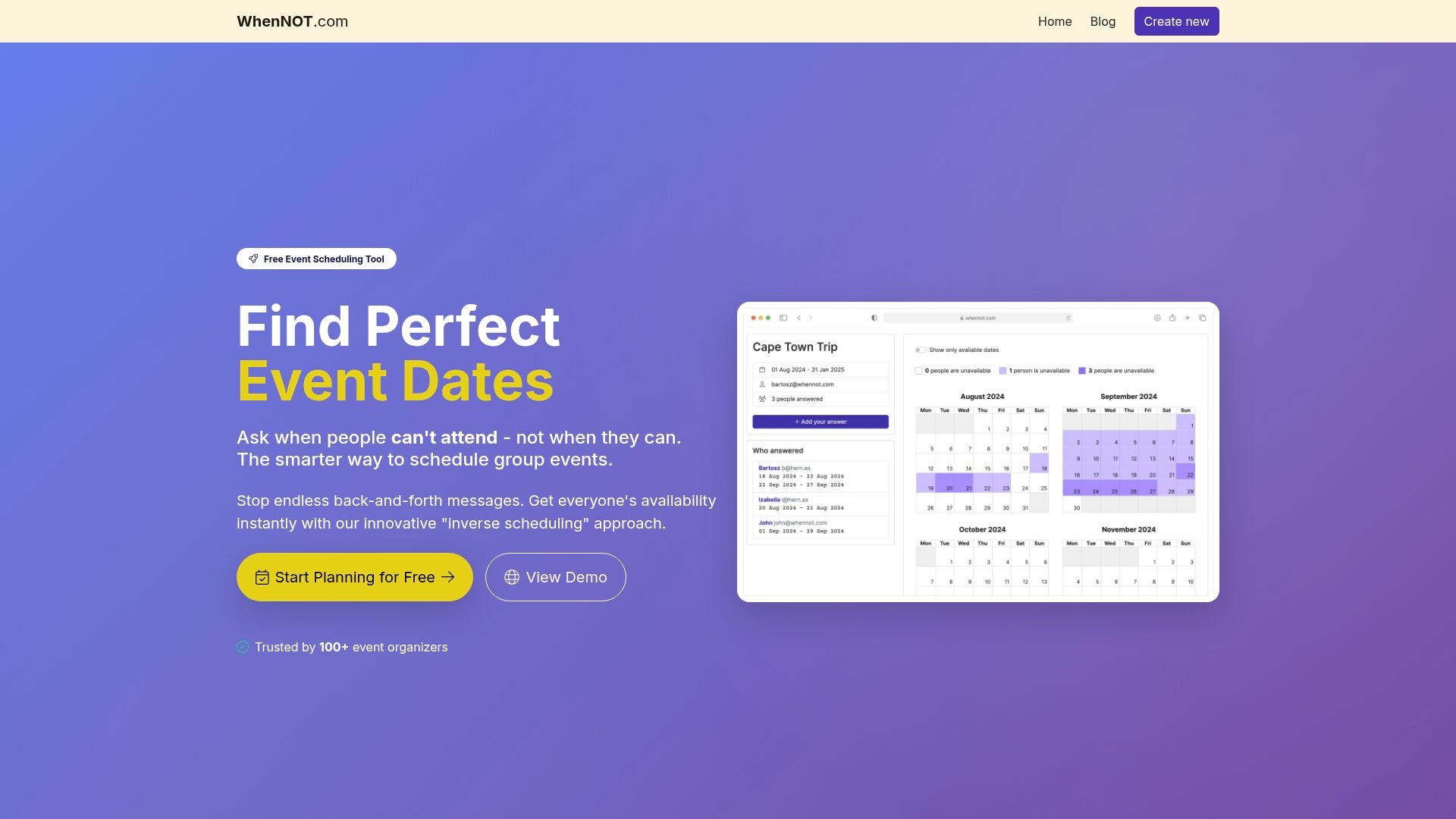
Experience effortless coordination with WhenNOT by creating an event, setting a flexible date range, and sharing a simple link so participants can easily mark their unavailable days without signing up. Its powerful visual tools help you quickly identify the best dates while respecting privacy and accessibility. Don’t let scheduling conflicts stall your event success. Try WhenNOT today and turn your group event planning into a smooth, stress-free process. Learn more about how smart scheduling can transform your events at WhenNOT and start organizing with confidence now.
Frequently Asked Questions
How do I define clear goals for my group event?
Defining clear goals involves establishing SMART objectives—Specific, Measurable, Attainable, Relevant, and Time-bound. Start by asking what you want to achieve and involve key stakeholders to ensure that your goals are meaningful and aligned with your group's broader objectives.
What scheduling tool features should I consider for group event planning?
When choosing a scheduling tool, look for features like automated time zone conversions, group availability visualization, and simple participant invitation processes. Ensure the tool allows participants to indicate their availability easily to minimize scheduling conflicts.
Why is setting a flexible date range important for an event?
A flexible date range increases potential participant attendance and reduces scheduling complexity. Identify three or more alternative dates early in your planning process, allowing you to adapt quickly to participant availability before finalizing a date.
How can I ensure participation is simple and accessible for all attendees?
To create an inclusive environment, consider various accessibility factors such as physical venue layout, communication method flexibility, and technology platform compatibility. Proactively communicate available accommodations and allow participants to share their specific needs when registering for the event.
What should I include in my final event plan review?
Your final event plan review should cover all critical logistics, including participant communication, venue arrangements, and technical equipment readiness. Create a comprehensive checklist and schedule a coordination meeting with key stakeholders at least one week prior to the event to ensure everyone is aligned and ready.
How can I visualize group availability to avoid scheduling conflicts?
Utilize scheduling tools that provide visual representations of participant availability, such as color-coded time slots for available and unavailable periods. Encourage participants to mark both their completely unavailable times and preferred meeting windows for a clearer overview of the group's scheduling dynamics.
Recommended
- Group Event Organization Process: Complete Guide - WhenNOT Blog
- 7 Habits of Successful Event Organizers You Should Adopt - WhenNOT Blog
- Event Organization Strategies: Complete Guide - WhenNOT Blog
- 7 Essential Team Coordination Tips for Smooth Group Planning - WhenNOT Blog
- The Essential Guide to Content Marketing Checklist - Paul Baguley